Trying GroupLab
On this page
What it is, in three sentences#
GroupLab measures how accurately a rifle shoots, from a photograph or a scan of a target you have shot. It is built around one idea: a small group tells you far less than shooters think, so every figure comes with the range it could really be, and the software says plainly when the evidence does not support a conclusion. It is free, it keeps everything on your own machine, it has no account, and it sends nothing you have not agreed to: sending a target, error reports and the hardware survey each ask first.
This page is for somebody who has never seen it. It is an unfinished test build, and the last section says what is not done.
Getting it#
- Download the installer or the zip from the nightly build. That build is published automatically from the newest change that passes the tests, so it is the one to test and the one to name in a bug report. Its address never changes, and every nightly also keeps a release of its own at
v<version>, so a build you named in a report still exists later. Every build is listed beside it. There is no numbered release yet, so nothing points at one. - Windows may say "Windows protected your PC". Click More info, then Run anyway. The Windows build is unsigned, because signing costs money the project has not spent; the source of the build is public. On 2026-09-21 two machines installed
grouplab-setup-win-x64.exefrom the nightly release and neither was warned, so it does not always happen; it is not promised either way, because SmartScreen decides per file and per machine and nothing here controls it. - Your antivirus may quarantine it, for the same reason. If it does, the file it took is
GroupLab.App.exe. - The installer puts GroupLab in the Start menu and in Add or remove programs. The zip needs no installing: unzip it and run
GroupLab.App.exe.
Nothing else is needed: the download carries its own .NET runtime.
The Microsoft Store also carries GroupLab for Windows (Get it from Microsoft), which gets every nightly once Microsoft has certified it and updates itself through the Store. For testing, take the nightly: it is the build to name in a bug report.
On the phone#
GroupLab for Android is the APK on the download page, or the Google Play internal test for those invited. Remove one before installing the other: they are signed with different keys. The Play copy gets every nightly through Google Play, and the plain APK keeps itself current as GroupLab Dev does; an APK from before nightly 177 has no updater, so install one newer plain APK by hand once; it keeps itself current after that. GroupLab Dev, also on the download page, installs beside either with no uninstall. In Brazil, Indonesia, Singapore and Thailand, certified Android phones have refused apps from outside Google Play since 30 September 2026 unless their developer has registered them with Google; GroupLab Dev and the plain APK were registered with Google on 7 October 2026; if a phone there still refuses one, ask on the Discord for the Google Play internal test instead. The rest of the world follows in 2027. On an iPhone or iPad, GroupLab is in a public beta through Apple's TestFlight: install TestFlight from the App Store, then open the invitation on the device; Send Beta Feedback in TestFlight, or a screenshot shared to it, reaches the project. On the Capture screen, Guided takes the picture by itself when everything is right and Manual leaves it to you; either way every picture is checked, with a score and notes on what GroupLab corrected. A result has every figure the desktop shows, with a tap on a name to explain it and a tap on a number to switch its units; Sessions compares loads, Ballistics is a tab of its own, and Targets prints a sheet or the printer check page.
It keeps itself up to date#
The installer's copy updates itself. It looks for a newer nightly when it starts, and a bar appears under the header naming the version, with Update now, Later and Skip this version. Update now downloads it, checks it against the build's signature, saves whatever you have open, says in one line that GroupLab will close and reopen, and comes back on the screen you were on. No installer window and no administrator prompt appear at any point. You can change how often it looks, or turn it off, in Settings, Updates and about.
The zip, the Linux tarball and the Mac builds cannot replace themselves, because they were unpacked or installed wherever you put them. They tell you a newer build exists and point you at the download.
One reinstall by hand, once#
v0.2.0-nightly.25 is the first build that can update itself. If you are on anything earlier, the update will not work and it is not your machine's fault: the signature those builds check was written differently on the machine that made them, so they reject a perfectly good update. Download the installer from the nightly release once, run it over the top, and self-updating works from then on. Nothing of yours is touched.
The update from nightly.25 to nightly.26 was then run end to end on a real machine, with real clicks: 97 MB downloaded and checked in under 15 seconds, no installer window, no administrator prompt, and GroupLab back on the screen it was on.
If a new build will not start#
Nothing of yours is at risk. Everything you have made lives in %APPDATA%\GroupLab on Windows (under your home folder on macOS and Linux): the settings, your sessions, any sheet you designed and the log. No installer and no uninstaller touches that folder, so a bad build cannot lose a session.
Going back is a download, not a repair. The update replaces the program in place, so there is no previous copy on the machine to return to. The build you were on still exists at its own address: open the releases list, find the v<version> release you were on, download its installer and run it. It installs over the broken one, and your things are exactly where you left them.
If that happens, say so in a report. It is the kind of thing that should be rare enough to be worth hearing about every time. The support page at https://grouplab.org/support/ says how, and [email protected] reaches Alan directly.
The first minute, with no rifle#
The easiest way is the guided demo. It is offered on the first run, and any time from Settings, General, or the header's menu as Walk me through a demo.
- Choose Walk me through a demo (about five minutes). GroupLab makes its own sample, a sheet with 25 shots that is nobody's target, and opens it in a tab called "Demo: sample sheet".
- GroupLab reads the sheet's printed codes, registers the page from the corner markers, finds the holes and puts each on its bull. Watch the status line.
- Settle anything the review queue raises in the side panel, then press Accept and analyze. The tour carries on from there, and nothing it makes is kept unless you tick Keep this demo in Sessions at the end.
A second way, on Windows only: the zip's samples folder holds gl-cf25-ltr-d-25-shots-600-dpi.png, a real 25-shot GroupLab sheet shot and scanned for the project, and published with its shooter's consent. Choose Open image in the header's menu and open it. The installer carries the same folder; the macOS and Linux downloads and the phones carry no samples folder.
Tell it the caliber if you know it. It sets the smallest hole GroupLab will accept and the edge-to-edge figure. On one small-caliber test scan naming it is the difference between nineteen holes found and twenty-four, and on another it is the difference between missing the shot cut by the edge of the scan and finding it. A .22 hole in paper is a good deal smaller than the bullet that made it.
Then click a hole. A small editor opens beside it: move it with the arrow keys, give it to another bull, set its size by hand, leave a note, or mark it a sighter, a flyer or not a hole. A flyer is called out and stays in the group; leaving a shot out of the figures is a separate, deliberate choice, and it asks no reason. Every hole has a thin line to its bull; a dashed orange one with a ? is worth a look, and clicking a bull then holes moves them to it. Everything you do shows a message with Undo on it, and Ctrl+Z, or Command Z on a Mac, works everywhere.
Reading what it shows you#
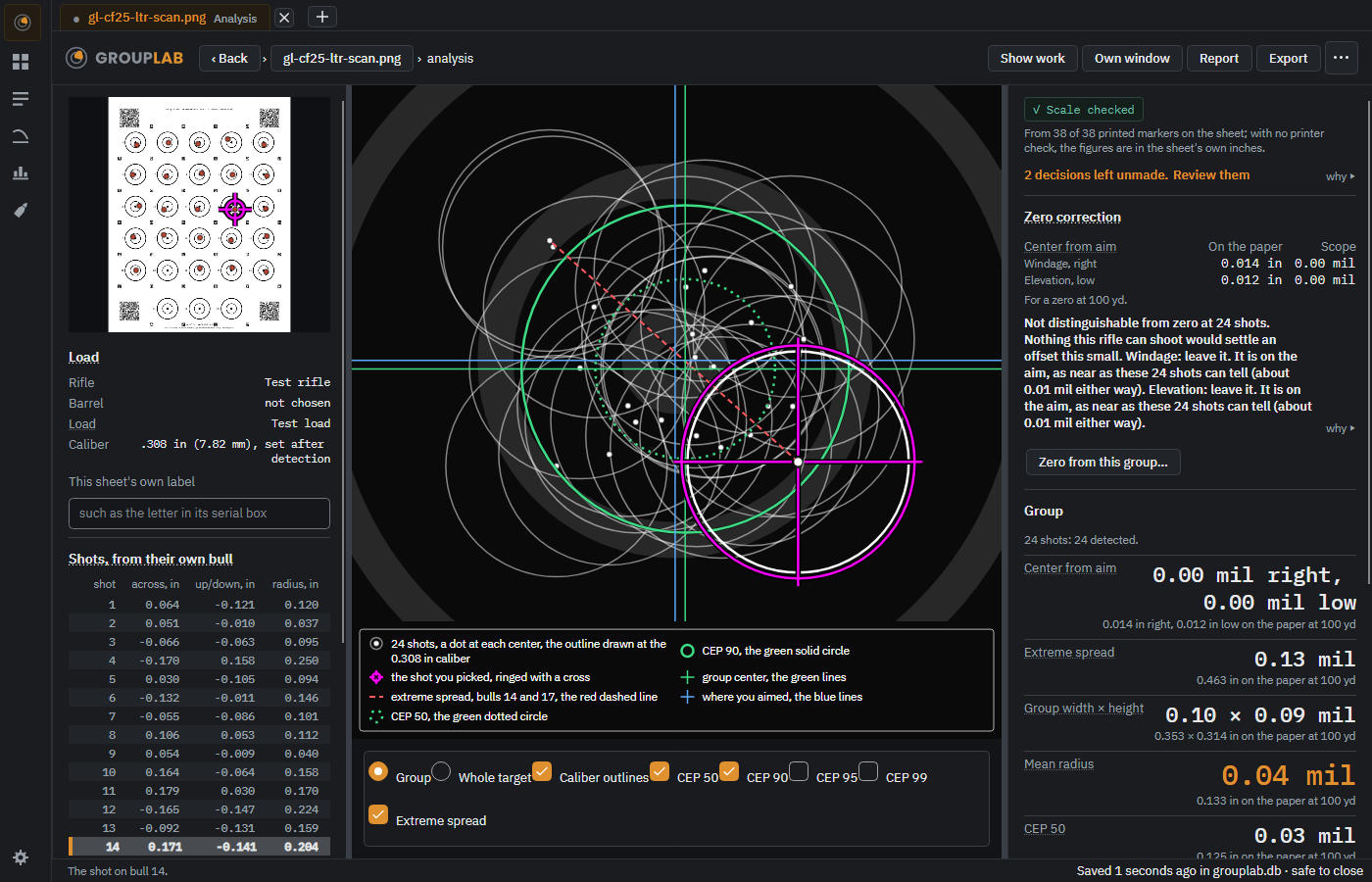
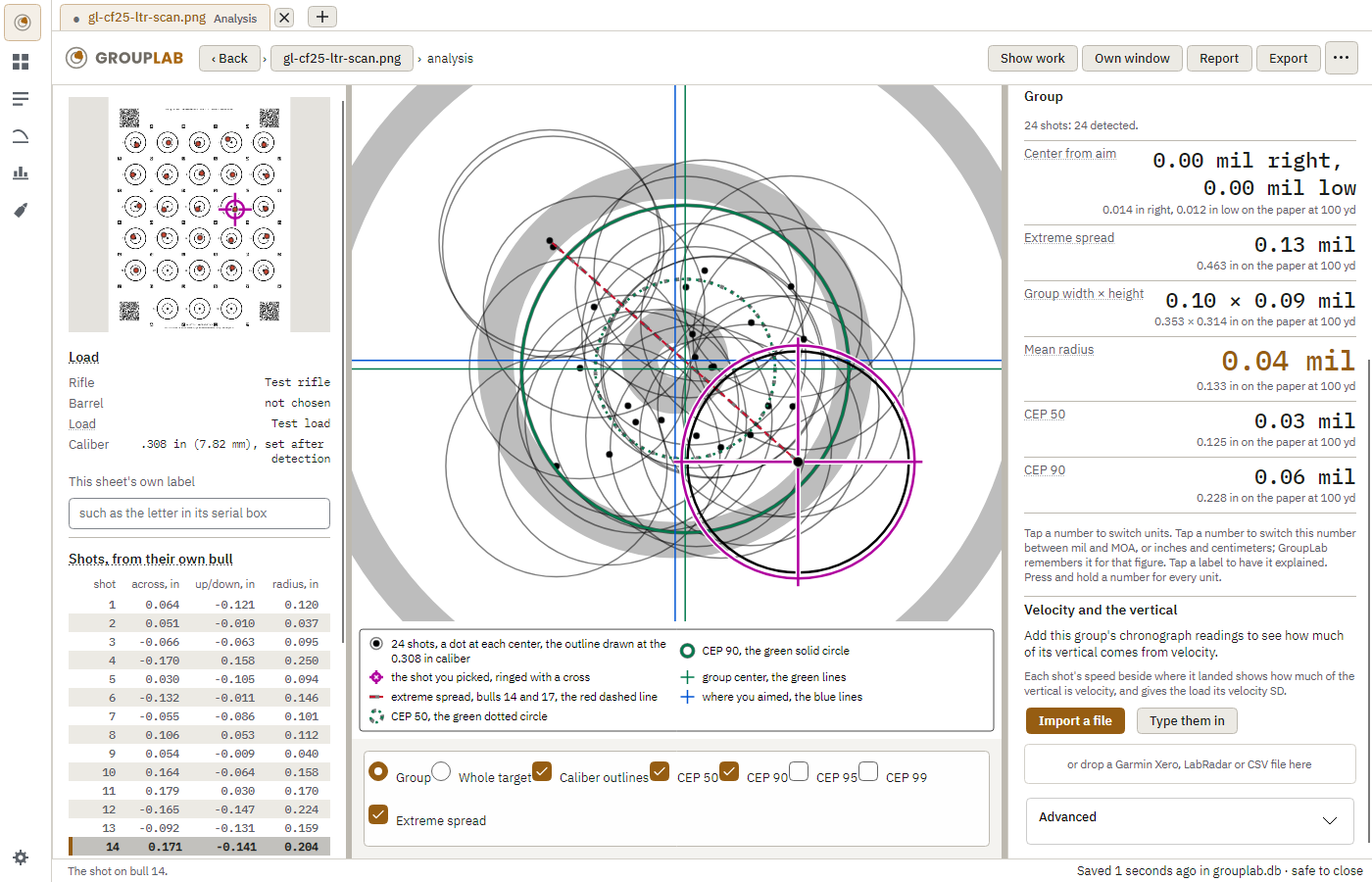
- The plot draws every shot on one bull, each from its own bull's center, with the group's center and its CEP 50 and CEP 90 circles.
- Every figure carries its interval: the range the true value is likely to lie in. That interval is the point of the software. A five-shot group's mean radius could easily be half or double what it measures.
- The zero correction says what to dial, in your scope's clicks, and refuses when the group's center is too close to the aim to tell from chance, saying how many shots would settle it.
- The two cards judge the group's shape and its worst shot, each naming the test it used and what that test could have detected.
- Every "why" opens the reasoning behind a figure, and there is now a ? beside every single figure giving two or three plain sentences, including what the number of shots does to it.
- The zero correction is given in MOA, mils, inches and centimeters at once, with your scope's own unit leading and the clicks spelled out where the rifle records a click value. The clicks are never guessed.
- Holes between bulls and off the grid are kept, counted and offered to you rather than dropped. Where GroupLab is unsure which bull a hole belongs to, it says so, and every figure built on that assignment carries the doubt until you settle it.
Printing a sheet and shooting it#
The rail on the left has Targets, where a sheet is chosen and printed: forty-seven built-in sheets, printed at actual size.
- Print with Open to print, and choose Actual size or 100 percent, never Fit to page.
- Measure bull 1 to bull 5 before you shoot: on the Letter 5x5 sheet it is 5.98 in (152.0 mm). If it is not, the printer scaled the sheet.
- Mount it flat, fire one shot per bull in order, and write only in the load block.
- Photograph it from about 2.5 ft on your phone's main camera with the whole sheet in frame, or scan it flat at 600 dpi. Do not crop it, and do not send it through a messaging app.
- Print a volunteer pack, beside the chosen sheet, gives the sheet and a page of these instructions together.
What is not done yet#
The repository's README is the authority on what works; this is the short version.
- Printing from inside GroupLab lost every marker and code on one printer, which made those sheets unmeasurable. That is fixed and held by a test on more than one printer driver, but no sheet from the fixed version has been checked on paper yet, so use Open to print.
- Hole detection on plain paper, with no sheet definition, is not built.
- Chronograph readings from a file (a spreadsheet CSV, a Garmin Xero export, and, still experimental, a LabRadar report or a BulletSeeker export) are reconciled with the shots by a proposed pairing you accept; that pairing has not yet been checked against a sheet shot with its string recorded in order.
- Two of the project's own gates have no material yet: no 25-shot editor timing and no blank-paper photograph. The mounted photograph gate has one day's material, 59 photographs from 2026-09-20, and GroupLab could not read about half of them; the second range day, 4 October, gave 137 of 145 holes found from GroupLab's own sheets with no false mark, and the gates still wait on more scans and photographs. So GroupLab is careful software that has not yet been proved against a large body of real targets.
- Linux and macOS are built and tested on every push. Nobody uses Linux day to day, and the Apple silicon Mac build has been run on two Macs with Apple silicon, by two testers; the platform statement on the download page says exactly what has been checked.
Telling somebody when it is wrong#
The gear at the bottom left opens the settings. Updates and about names the build under This build: copy that line into any report, because a test build changes whenever the code does. Report a problem in Settings, Help and problems, opens a window that lists what the report holds, with a box for what happened and one for a way to reach you. Write what happened and press Send: the report goes to the project with the error and the logs of its run, carrying no location data and no photographs. Save only writes it as a zip instead. Only when sending is not open yet, or a send fails, does the window say so and suggest sending the saved zip by opening an issue at https://github.com/oRAirwolf/grouplab/issues or by email to [email protected], with a line about what you were doing. The support page at https://grouplab.org/support/ explains the same and is easier to find again.
GroupLab keeps everything in %APPDATA%\GroupLab on Windows, and under your home folder on macOS and Linux: settings, your sessions database, any sheet you design, and the log. To remove it, uninstall or delete the folder you unzipped, and delete that folder when you want the data gone.