

Tour › Marking and review
Marking and review
Every hole found and numbered to its bull, with anything uncertain raised for you to settle.
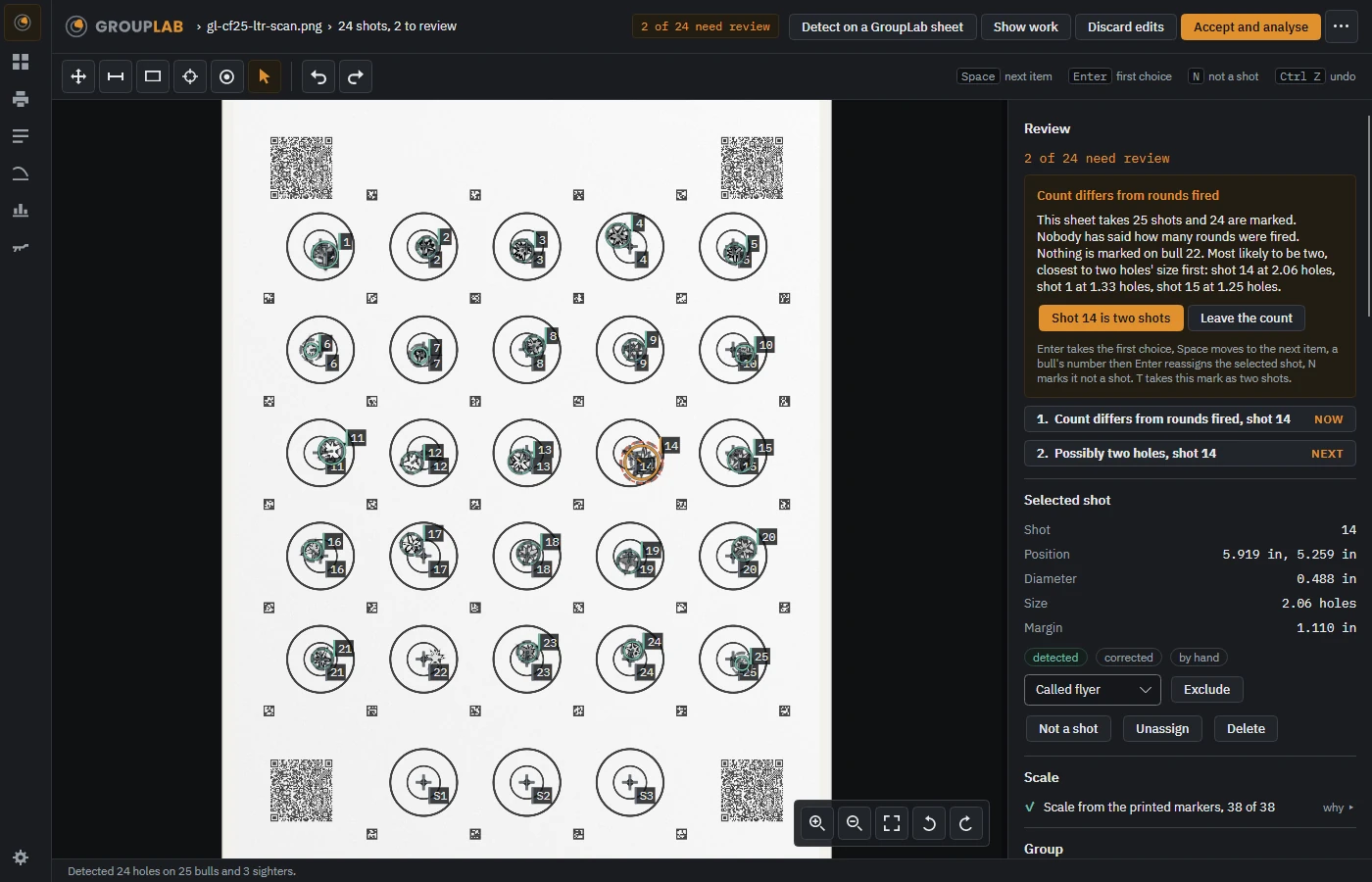
From the newest build of GroupLab, regenerated every week. Tap the picture for it full size.
What this screen is for
This is where GroupLab shows its working before it measures anything. It finds the holes, works out the scale from the printed markers, and assigns each hole to a bull. Where it is not sure, it says so and asks, rather than quietly guessing and giving you a clean-looking number built on a guess.
What you are looking at
- The count at the top. How many shots are marked and how many need review, so you know how much is left before you can trust the result.
- Review, on the right. One question at a time, in order, each saying what GroupLab thinks and why. The buttons are the answers. Here it has found 24 marks on a sheet that takes 25, nobody has said how many rounds were fired, and it has put its best candidate first with the evidence for it.
- The numbered list underneath. Every question still to answer, the current one marked NOW and the next marked NEXT.
- The keyboard line. Space moves to the next item, Enter takes the first choice, a bull's number reassigns the selected shot, N marks it not a shot. Faster than the mouse once a sheet has a dozen questions.
- Selected shot. Everything known about the one you have picked: where it is, how wide the hole is, how many holes' worth of ink it contains, and how far it is from anything else. The three chips say whether it was detected, corrected by you, or added by hand.
- Called flyer and Exclude. Marking a shot you called as a flyer, or leaving it out of the measurement. GroupLab keeps it on the sheet and says so in the analysis rather than deleting it.
- Scale. Which markers gave the scale and how many of them were read. This is what makes the measurement real, so it is shown rather than assumed.
- The tools along the top of the picture. Pan, measure, box, the scale ends, the bull picker, and select. Undo and redo sit beside them.
- Detect on a GroupLab sheet. Runs the detection again, for instance after you have entered the calibre.
- Accept and analyse. When you are satisfied. It saves the session and takes you to the analysis.
What you would do here
- Open your photograph or scan, by dragging it onto the window or from the file menu.
- Answer each review item in turn, using the buttons or the keys shown.
- Drag any mark that sits off a hole, and use a bull's number to move a shot to the right bull.
- Mark anything you called as a flyer, so the analysis can say what difference it made.
- Press Accept and analyse.
Where it fits
After you have shot and photographed a sheet from printing. It leads to the analysis.