

Tour › Capture
Capture
Photograph a GroupLab target with the phone, or choose a photograph, and GroupLab finds the holes and measures the group.
On the phone only. On a computer, open a scan or a photograph from the marking screen instead.
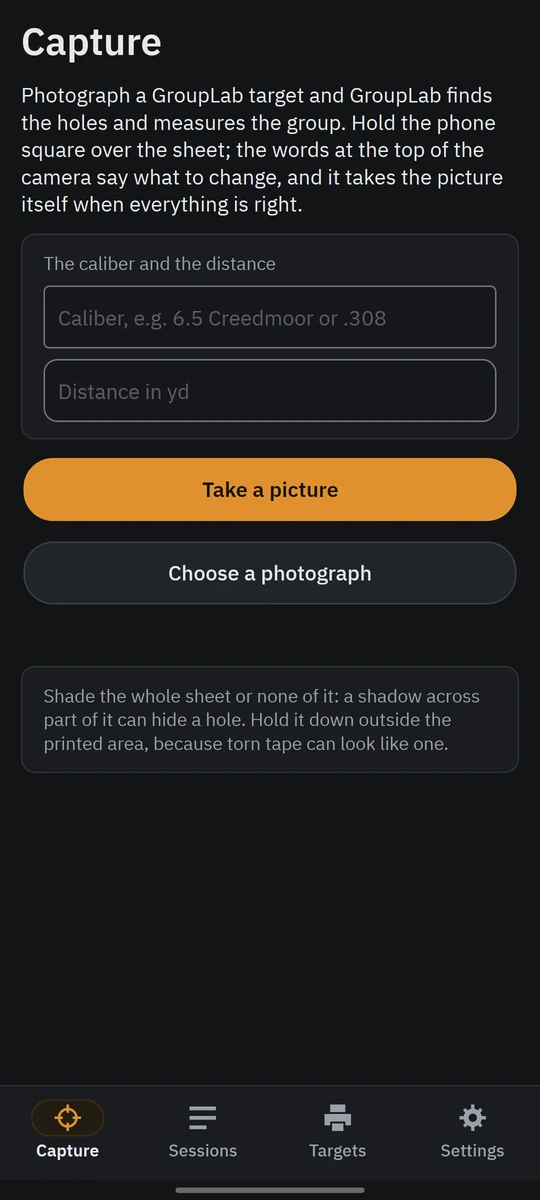
Capture on a Galaxy Z Fold 7's cover screen, nightly 115.
What this screen is for
The phone's first screen. Hold the phone square over the sheet and the words at the top of the camera say what to change; it takes the picture itself when everything is right. A photograph already on the phone works too.
Without a GroupLab sheet
Placing bulls by hand on a target GroupLab did not print is on the desktop only, for now; the phone is for GroupLab's own sheets. What GroupLab can measure.
What you are looking at
- The caliber and the distance. Optional, typed before the picture: the caliber sizes the holes, and the distance turns sizes into angles.
- Take a picture. Opens the camera, which says what to change and takes the picture itself.
- Choose a photograph. Opens one already on the phone.
- The tip. Shade the whole sheet or none of it, and hold it down outside the printed area.
What you would do here
- Type the caliber and the distance if you know them.
- Tap Take a picture and hold the phone square over the sheet until it takes the picture.
- Read the result that opens.
Where it fits
Its result is the analysis, kept in sessions. The sheets come from Targets.